Exporting Claude Code transcripts
I do a lot of reasoning in Claude Code. With Zoltar, for example, I’m constantly asking the assistant to help me interpret the results of eval runs, weigh architecture tradeoffs, or provide advice on prompt edits. Perhaps surprisingly, I also do a lot of worldbuilding with Claude Code. For my D&D game, I might ask it to help me populate a dungeon, including building custom stat blocks for monsters that fit the dungeon’s theme.
For worldbuilding, the discussion often is the output. I want to record all the reasons we explored for the Dragon Empire to invade the Goblin Marches, not just what we settled on. Who were the different factions, what were their overt and hidden agendas, and who betrayed their allies? Those are the things I’ll want to refer back to in the future, not just the decisions that were made.
For technical discussions, recording the conversation is less important because often you care only about the outcome — what the code actually does — and not all the debate and dead ends that went into building it. But for some discussions, high-level architecture discussions in particular, you do want to be able to refer back to the options that were considered and rejected. And sometimes even in lower level discussions, it’s helpful to be able to refer back to who said what and why.
Claude’s web interface gives you this for free, of course. Threads are saved by default, and they’re searchable. That interface, however, doesn’t have access to the code and data and remote hosts and all the stuff that makes Claude Code so powerful. I’m often faced with a difficult dilemma: do I work on the web, where the conversation is preserved but limited, or do I work in Code, where the conversation is unrestricted but also unrecorded?
Introducing CCTX
Calling the conversations “unrecorded” is a bit of an overstatement because, as it turns out, the conversations are persisted on the local host, albeit in an undocumented and ever-evolving format. If my project is at /Users/alexgs/projects/dnd-setting, Claude Code stores its logs at ~/.claude/projects/-Users-alexgs-projects-dnd-setting/<session-id>.jsonl. Each line in the log is a JSON blob that represents a user message, an assistant message, a tool use, or a handful of other types. This is known as JSONL format, and it’s common in logs.
The fact that there’s a log of the session is important because if the user and assistant messages are logged, then we can extract the dialog while dropping all of the tool uses and other noisy details.
To make this easy, I’ve developed a utility called “Claude Code Transcript Export” or cctx that parses the JSONL format and exports it as a markdown file that can be tracked, reviewed, and committed. The utility will even save images that were pasted by the user.
How It Works
As mentioned above, cctx only exports certain record types, namely the user and assistant messages plus some housekeeping types. It ignores all other message types, including thinking, tool uses, and tool results. It takes the exported lines and converts them into readable markdown. This makes the conversation easy to review. It looks like a thread on Claude’s web interface instead of a server log.
One sample exchange between the user and the assistant spanned 11 records and 32 KB of data. cctx strips that down to the 5 KB of prose that a reviewer actually cares about. Here’s a line of JSONL from that sample exchange representing the single user message, where 685 bytes wrap 172 characters of actual question:

And here’s what that message and the assistant’s response look like in markdown:
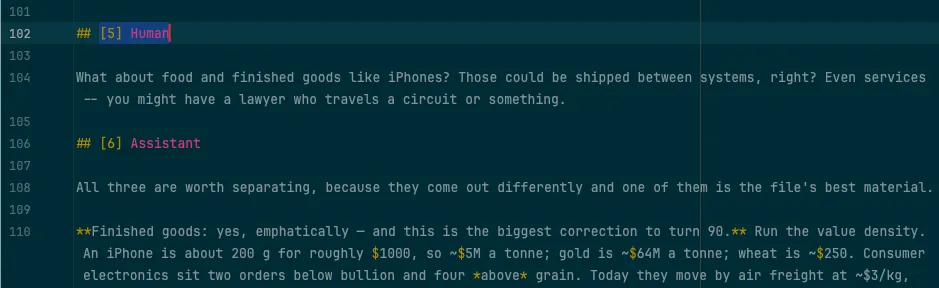
Turns are numbered, which makes it easy to cite specific sections in code reviews and other documents.
Tool uses and results are where secrets like database passwords and API tokens commonly show up. By dropping these record types, we’re removing most of the secrets from the exported transcript. Secrets that appear in user or assistant messages will still leak into the exported transcript, so be on the lookout for those.
It is possible to turn on export of tools, and you should understand that this is dangerous for exactly the reason above — it can leak secrets into your repository. We don’t do any redaction or checks for secrets in the transcripts, so the onus is on the user to check for leaked secrets before committing the transcript to their repo.
cctx uses a couple of different mechanisms to prevent transcript duplication. For a given conversation, the utility looks to see if there’s an existing transcript. If there is, it’s compared against a freshly generated transcript. If they match, then nothing is written to disk; if they differ, then the fresh transcript is saved.
The other mechanism is for conversations that have been renamed. The output filename format is <date>--<slug>--<id8>.md where id8 is the first 8 hex characters of the session UUID. At the end of a run, the program looks in the output directory for any files where the id8 matches a file that was written during this run. The pre-existing files are from conversations that were renamed, so the older versions are now stale. The stale conversations are removed and the current ones are retained.
As mentioned earlier, the Claude Code output format is undocumented and constantly changing. When the parser breaks or the output looks funky, you can run cctx probe. That will report every record and block type the program sees and name the ones this version does not handle. Please use that information to file a new issue, and I will look into it as I’m able.
How to Use It
cctx is easy to use in any project where you use Claude Code. Install the utility globally with npm install -g @alexgsdev/claude-code-transcript-export. This makes cctx available for use across your system. From inside your project, you can use it like this:
cctx init      # write .claude-export.yaml — its location marks the project root
cctx list      # see every session, with its UUID
cctx           # write transcripts
Full usage details are provided in the README.
How I Use It
I currently use this program in several projects, both technical and non-technical, to record and preserve conversations with Claude Code. I commit the transcripts to version control, along with the code and other documentation.
Before I export a transcript, I make sure the session is finished. I quit Claude Code, just to be sure. Then I run cctx. Easy-peasy!
cctx could be used to capture an in-progress session. That’s not something I do, so I’m not sure exactly what that workflow would look like. If you use the program like this, I’d love to hear from you!